
No Headshot? GOAT Leads Will Make You One
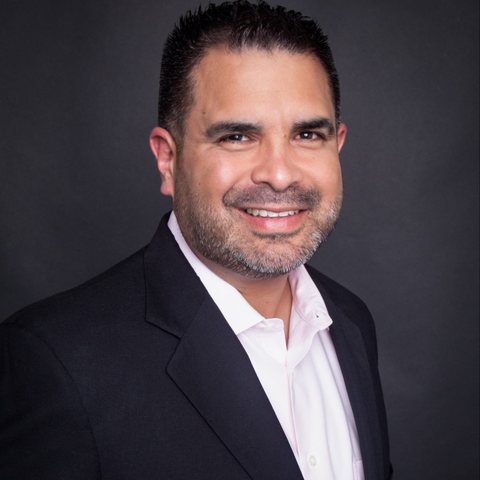
Yesterday we showed you the numbers: agents whose thank-you page carries their photo and title record about 30% more closed leads than agents who show a phone number alone. Most agents read that and agreed. Then they did not add a photo, because they do not have one they like. Starting soon, that excuse is gone. GOAT Leads will make the headshot for you, from any photo on your phone, in about a minute, right where your thank-you page settings live.
The Short Version
- The thank-you page works. Your photo and title on that page are worth roughly 30% more recorded closes and about $12,900 in additional annual premium per 1,000 leads. The full breakdown is here.
- The photo is the piece agents skip. Of everything your page shows, the Display Photo is the piece most often missing, and the reason is almost always the same: no headshot, or not one you would put in front of a stranger.
- Now GOAT makes the headshot. A new Create Professional Image button sits next to your Display Photo in Lead Settings. Pick any clear photo of yourself and it returns a professional headshot with a clean background and proper lighting. Your face, not a model's.
- One click updates every live page. When you save, you can also push the new photo to every active thank-you page you already have running, so the fix reaches leads today, not just on your next order.
Why the Photo Is the Hard Part
When we looked at agents with an incomplete thank-you page, the pattern was consistent. Title, phone and NPN get filled in, because they are typing. The photo stays empty, because it is a project. You need someone to take it, decent light, a plain wall, and a version of yourself you are happy to have a lead stare at while deciding whether to answer your call.
So agents do one of three things. They leave the slot blank. They upload a cropped vacation photo with a beach behind them. Or they book a photographer and mean to upload the result someday. All three cost you the same thing: leads who look at a page with no face on it and treat your call like every other unknown number.
A lead who just gave their information to a stranger is deciding, in the next few seconds, whether you are real. A name, a title and a face make you a person. A phone number makes you a telemarketer.
What the New Tool Does
We built the headshot generator into the exact spot where the photo goes: Settings → Profile & Preferences → Lead Settings, on the Lead Defaults card. Beside the Display Photo upload you will see Create Professional Image.
- Pick a photo. Upload a new one or use the Display Photo you already have. A selfie in decent daylight is plenty. Face the camera, no sunglasses, no hat.
- Click Create Professional Image. The AI processes your photo and produces a headshot: neutral background, improved lighting and framing, light retouching. It runs in the background, so you can keep filling in the rest of the card while it works.
- Compare and choose. You see your original and the result side by side. Use this photo takes the new one. Try again runs it once more. Keep original leaves everything exactly as it was. Nothing changes on any live page until you decide.
- Save Lead Defaults. The photo you chose becomes the Display Photo that every new order starts with. You can still crop it the way you always could.
Two honest notes. First, this is your face. The tool cleans up the background, the light and the framing; it does not swap you for a stock model, and it will not make you look like someone you are not. Second, it is one professional style, and it is very good at that one style. If you already have a real studio headshot, keep using it. This is for the roughly two out of three agents who do not.
Update Every Live Page at Once
Here is the part that matters most if you have orders running right now. Your thank-you page is a snapshot taken when the order was created, so a new Display Photo normally only reaches your next order. That would leave the leads coming in this week looking at the same empty slot.
So when you save a new photo you will see a checkbox: Also update my active thank-you pages, with a count of how many of your live orders would change. Check it, save, and the new photo goes onto every one of those pages immediately. It updates the photo only. Your title, phone, calendar link and everything else on those pages stay as they are, and any thank-you page you have customized by hand is left alone. When it finishes, it tells you exactly how many pages were updated and how many were skipped.
If you have zero active orders, you will simply be told that, and your next order picks up the new photo automatically.
Finish the Whole Card While You Are There
The photo is the hardest field, which is why we built a tool for it. It is not the only one. Your thank-you page is doing its job when everything a lead sees on it is filled in, and the Lead Defaults card shows you what is still missing:
- Display Name and Email: copied straight from your profile, so these are usually done already. Check that they are the name and address you want a lead to see.
- Display Photo: now a one-minute job.
- Display Title: what you do, in the words a client would use. Not "Insurance Agent." We showed yesterday that the best titles close at about 1.5x the average on the same leads, and the card now suggests titles based on what you actually buy.
- Display Phone: the number leads will see and, more importantly, the number they will recognize when you call.
- NPN: your license number. It is the fastest way to prove you are a real, licensed agent and not a lead-gen front.
Website and calendar link are there too. Add them if you have them; they are optional. Everything above is what a lead sees first, so fill all of it in. To be clear, none of this blocks an order. You can buy leads today with a blank page. You just should not, because the page with a face and a name on it is the one that gets answered. When the card is filled in, you can preview the page exactly as your leads will see it.
When You Can Use It
The headshot tool is in final testing now and will be turned on for every agent in the coming days. You do not need to do anything to get it. When it is live, the Create Professional Image button will simply appear beside your Display Photo in Lead Settings, and the dashboard reminder about your thank-you page will point you straight to it.
In the meantime, the rest of the card is ready today. Open Lead Settings, fill in your title, phone and NPN, and pick the photo you want to start from. Then, the day the button shows up, one click finishes the job.
We built this because the data left us no choice. The thank-you page is the cheapest close-rate improvement on the platform, the photo is the piece holding most agents back, and a photo problem is one we can actually solve for you. So we did.
Numbers in this post are from our thank-you page study of 274,534 realtime leads delivered May 1 to August 15, 2026. Close-rate figures are relative comparisons between agents on the platform who record their sales; see the original post for the method.
Ready to grow your book of business?
Get exclusive, TCPA-compliant insurance leads delivered to your CRM in real time.
Get LeadsRelated posts
GOAT CRM SoftPhone V2
The new GOAT Connect softphone, only in GOAT CRM. See who is calling, text without hanging up, set callbacks in the lead's time zone and log the sale before the call ends.
10/26/2026
2 min read
One Order, Your Whole Team: Lead Sharing for Agency Owners
Lead Sharing replaces Lead Transfer and Lead Lending, plus a tour of everything in the Agency module: invites, downline, team performance, live calls, CRM seats and more.
10/24/2026
4 min read
GOAT CRM Workflows: A Game Changer for Every Lead You Buy
We never set out to build a CRM company. We built GOAT CRM Workflows to make every lead you buy work harder: worked in seconds, followed up for days, and booked with one reply.
10/14/2026
7 min read